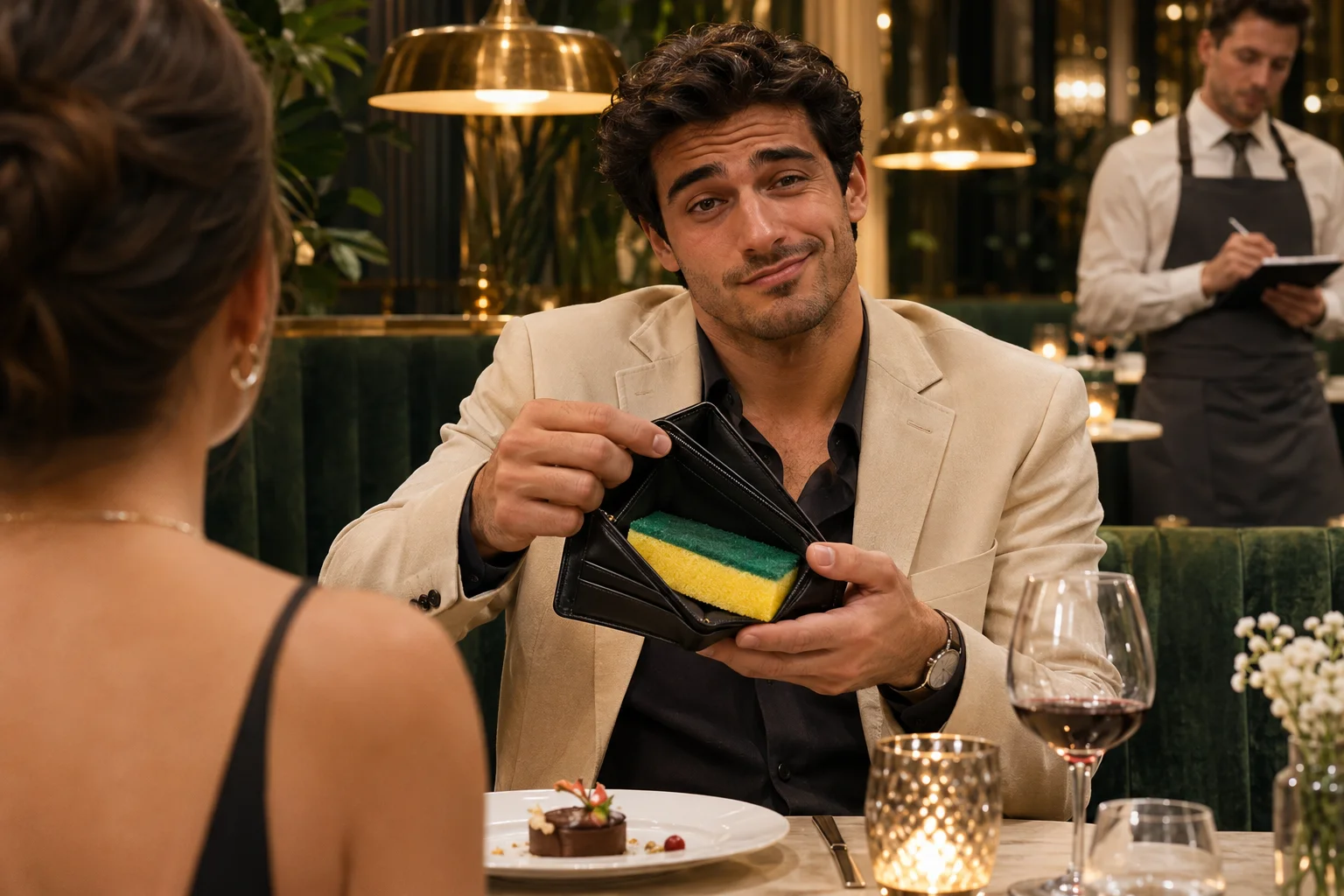
Explore the sponge-wallet restaurant template, watch its two source clips, and copy complete image and video prompts to build a version from scratch or replace the payer in the reference performance.
Illustrative AI artwork. Actual reference clips below.
What this template actually contains
The You Never Let Her Pay AI meme template is a reference-driven scene recipe. Its first clip sets up the offer to pay and reveals the sponge inside the wallet. Its second clip takes the payer from the table to the kitchen. Your portrait changes the main character’s identity; the template retains the source performance and story. It is a browser-based generation workflow, not a downloadable editing project.
WATCH THE RECIPE
The two reference clips, in order
Watch the clips separately to see the cut point. The combined output keeps the same order, with the wallet close-up immediately followed by the restaurant reaction.
01
Clip 01 — The card refusal and sponge reveal
Approximately 4.55 seconds. The payer sits across from the date while a waiter presents a terminal. An open-palm gesture stops the offered card. A cut brings the camera close to the black wallet and exposes the yellow-green sponge. The hand movement and face performance are guided by this clip.
02
Clip 02 — The waiter’s alternative payment method
Approximately 5.71 seconds. The payer sits beside the waiter, gets up and follows them through the restaurant. The waiter guides the payer with a hand on the upper back. The final cut reveals a kitchen stacked with dishes. This version ends at the reveal; it does not show a washing montage.
UNDERSTAND THE EDIT
What changes, and what belongs to the template
Treat the reference as a performance you step into. It is not a blank timeline where every character and action can be replaced.
Template element
How your version uses it
Main character
Your uploaded adult face, hair and identity replace the payer in both clips.
Wardrobe
Clothing, headwear and visible accessories follow your uploaded photo across all three edited frames and both video clips.
Acting and camera
Source gestures, facial expressions, gaze, walking pace and original cuts guide the generated performance.
Supporting cast
The existing date and waiter stay in their roles; extra portraits are not supported.
Props and ending
The card terminal, sponge-filled wallet and kitchen dish pile remain essential to the joke.
Delivery
One approximately ten-second 9:16 MP4 assembled from two generated scenes.
Illustrative AI portrait
ONE PERSON, TWO SCENES
A photo checklist for this specific template
Use a single-person adult portrait with natural facial detail. Check that both eyes, the nose, jaw and hairline are readable. The reference turns the head and shows a side view, so avoid extreme wide-angle selfies and face-shaping filters. You can use a relaxed or neutral expression: the reference determines the acting. A different background is fine because it will not become the restaurant.
Before uploading, make sure you are using your own image or have the adult subject’s permission. Do not use a group photo expecting the system to choose the right person. The current template accepts exactly one portrait and replaces exactly one role.
Place the setup caption before the wallet opens. Leave the lower and middle parts of the frame clear enough to see the sponge. Avoid announcing the dishes in the first line if you want the kitchen cut to land as a second punchline.
01
The classic setup
“POV: you never let her pay” leaves the explanation to the image. It works when the viewer can see the raised hand, wallet close-up and kitchen ending without extra context.
02
A self-roast
“When confidence clears but the card doesn’t” makes the payer the target of the joke. Keep it brief so the viewer can follow the changing camera angles.
03
A date-night version
“I said I’d handle dinner” gives the same action a different setup. Add your wording in your editor or social app after downloading; the generator does not burn in a custom caption.
CHOOSE THE RIGHT TYPE OF TEMPLATE
AI generation or an editable video template?
If you want your own face performing the source actions, use this AI template. If you want to rearrange clips manually, change transitions or export an editable project, look for a timeline-based editor. A CapCut template link and a reference-based AI generator solve different tasks; this page supplies the latter.
COPYABLE PROMPTS · FROM IDEA TO FINISHED CLIP
You Never Let Her Pay AI meme prompts: build it from scratch
Choose a workflow before pasting a prompt. The from-scratch examples below describe new shots for an image-to-video or text-to-video tool. The reference-editing prompts use an existing performance to preserve its actions and expressions. Both tell the same sponge-wallet story, but only the reference workflow has the original acting as an input. These are reusable prompts and planned settings, not a guarantee of identical results across models.
The prompts are written in English for reuse. Replace the character description in square brackets once, then keep it consistent throughout. If your tool accepts image references, reuse the same character image for both scenes. If it supports text only, repeat the same identity and wardrobe description in both video prompts; visual consistency can be harder to maintain.
Create the restaurant opening image. Specify one adult payer, a cream blazer, the date opposite and a waiter with a terminal. Keep the sponge hidden.
Generate the first clip using the first video prompt. Check that the raised hand comes before the wallet close-up, and that the sponge is readable.
Prepare the second opening frame using the same identity and clothes, then generate the waiter escort and kitchen reveal as a separate clip.
Review both clips for continuity, join scene 1 then scene 2, and add the setup caption in your editor. Do not generate the words as part of the image.
1. Character and restaurant opening-frame prompt
For an image-generation tool. Replace [DESCRIBE ADULT FACE, HAIR AND SKIN TONE] with your character description. For your own face, supply an authorized portrait through the tool’s image-reference controls; descriptive text alone cannot identify a particular person.
Create a photorealistic vertical 9:16 opening frame for a restaurant comedy video. One adult payer, [DESCRIBE ADULT FACE, HAIR AND SKIN TONE], wears a cream blazer over a dark shirt and sits in a green upholstered restaurant booth. An adult date sits opposite, seen from behind in the foreground. A waiter in a white shirt stands to the payer's right, holding a card terminal. Warm brass pendant lights, wooden table, plates and glasses, natural evening restaurant lighting. The payer looks calmly confident and is about to stop the date from paying. Keep the full face, natural hands and terminal visible. The wallet remains closed; do not reveal a sponge yet. Medium shot at table height. Realistic proportions and skin texture. No text, logos, collage or watermark.
2. Video prompt — the card refusal and sponge wallet
Plan approximately 5 seconds in 9:16. Attach the opening image if supported. The shot timings are a starting point for an original interpretation; inspect the result because timing and multi-shot adherence vary by tool.
Photorealistic restaurant comedy, vertical 9:16, approximately 5 seconds. Use the prepared character image as the identity and wardrobe reference. Keep the same adult payer in a cream blazer and dark inner shirt throughout. Preserve the date, waiter, table and warm restaurant lighting.

Shot 1, approximately 0-3 seconds: an adult date offers a bank card toward the waiter's terminal. The payer calmly raises one open hand to stop the payment, gives a small confident look, and reaches for a black wallet. The date pauses. The waiter waits beside the table. Keep movements restrained, physically plausible and readable.

Shot 2, approximately 3-5 seconds: make one clean cut to a close-up of the payer's hands opening the black wallet. Inside is exactly one yellow-and-green kitchen sponge, with no cash or bank cards. The sponge is clearly visible before the clip ends. Keep the cream blazer sleeves consistent. The close-up is the punchline, so do not cover it with text or create another prop. Natural fingers and object contact. No extra people, facial changes, slow motion, surprise camera spins or added scenes. Use simple restaurant ambience without dialogue.
3. Matching opening-frame prompt for scene two
For an image-generation or image-editing tool. Supply the same character reference or accepted first-scene frame to help retain the face, cream blazer and restaurant set. Start beside the waiter, before the character stands.
Create a photorealistic vertical 9:16 opening frame for the second clip of the same restaurant comedy. Use the SAME adult payer identity, cream blazer, dark inner shirt, waiter and warm restaurant set from scene 1. Show a side angle of the payer seated at the table with the waiter standing beside them, card terminal in hand. The payer is about to stand and follow the waiter. Match the face, hair, apparent age, wardrobe, lighting and screen direction from the first clip. The date remains part of the restaurant context. No sponge close-up in this frame, no sink opening shot, no extra character, no text or watermark.
4. Video prompt — the walk and kitchen payoff
Plan approximately 6 seconds in 9:16. Use the second opening frame and the same identity reference. End at the dirty-dish reveal; a washing sequence changes this version of the joke.
Continue the same photorealistic restaurant comedy, vertical 9:16, approximately 6 seconds. The exact same adult payer wears the cream blazer and dark inner shirt from scene 1. Use the second prepared opening frame for the starting composition and identity. Keep the same waiter and restaurant lighting.

Shot 1, approximately 0-2 seconds: the payer reacts quietly beside the waiter, then rises naturally from the booth. The waiter places a guiding hand gently on the payer's upper back.

Shot 2, approximately 2-4.5 seconds: the waiter escorts the payer through the restaurant toward the kitchen. Keep the payer's face, hair, body proportions and cream blazer consistent in profile and rear views. Natural walking pace and stable camera movement; no teleporting or sudden wardrobe change.

Shot 3, approximately 4.5-6 seconds: make a clean cut to the kitchen, revealing stacks of dirty plates and bowls beside a sink. The waiter presents the dishes with a small gesture; the payer reacts with an awkward, resigned expression. Hold long enough to understand that the sponge is the payment plan. End at this reveal. Do not add active dishwashing, a washing montage, a third story scene, captions, logos or watermark. Natural kitchen ambience, no new dialogue.
5. Continuity and unwanted-change constraints
Use this checklist while reviewing both clips. Tools with a negative-prompt field may accept the unwanted changes there. Otherwise, keep the constraints in the main prompt. Constraints reduce ambiguity but cannot guarantee a perfect render.
Continuity checklist for BOTH clips: exactly one replacement payer; identical face, hair, apparent age, skin tone, cream blazer and inner shirt; the same waiter and date; consistent warm restaurant lighting. Hands must contact the wallet, terminal and furniture naturally. Show exactly one yellow-green sponge inside the wallet. Preserve the story order: stop the card, open the wallet, reveal the sponge, stand and follow the waiter, reveal the dishes. Avoid identity drift, duplicate faces, distorted hands, disappearing props, invented washing actions, unreadable wallet framing, caption overlays, extra cuts and watermarks. If the tool has no separate negative-prompt input, append these constraints to the main prompt.
Workflow B — prompts for reference-video identity replacement
The following prompts are taken from this site’s two-scene configuration. They are useful when you already have an authorized reference performance and want the payer to look like a different consenting adult. A tool must support the relevant image, video and audio inputs; pasting these words into a text-only generator will not supply the source performance.
Picture 1: edited first frame
For each clip, edit its exact opening frame using the payer portrait. Keep the camera angle, body position, clothing and supporting cast. Use the edited frame as Picture 1 in that clip’s video request.
Video 1: matching source clip
Use the restaurant-and-wallet source for scene 1 and the waiter-and-kitchen source for scene 2. Do not pair both images with the same video or reverse the source clips.
Audio 1: synchronized source audio
If the selected tool supports audio references, extract the corresponding clip’s soundtrack from time zero. Match the audio to the same scene. Avoid adding the same soundtrack twice in the final edit.
Edit three source frames with the same uploaded portrait: Image 1 is the source scene frame; Image 2 defines the complete replacement appearance. Generate the restaurant opening, waiter-side opening and kitchen ending. For video 2, Picture 1 is the waiter-side edited frame and Picture 2 is the edited kitchen frame: two views of the same person.
6. Reference first-frame edit — restaurant scene
Use in an image-editing step with scene 1’s original opening frame plus the single payer portrait. The unchanged waiter, date and props are important composition anchors.
Image 1 is the exact source scene frame to edit. Image 2 is the uploaded adult payer portrait, the ONLY source of the payer identity. Replace the entire payer appearance using Image 2: face, complete head, hair, skin, clothing, colors, fabric, neckline, sleeves, headwear, glasses, jewelry, makeup and facial decorations. Image 2 is the sole appearance authority in ALL THREE frames. Remove the original cream blazer and original accessories unless they appear in Image 2. Match all visible uploaded outfit details exactly; for body areas outside the uploaded photo, extend the same outfit coherently without inventing new accessories. Preserve recognizable facial features and apparent age. Reconstruct the new identity at the EXACT original head angle, gaze, eyelid position, eyebrow height and mouth expression in Image 1. Do not copy the portrait expression or pose. Preserve the waiter and date identities, all body poses, hands, furniture, props, lighting, composition and occlusions. Never duplicate the uploaded person. Output one photorealistic vertical 9:16 frame, no text, collage, inset portrait or watermark. Scene 1: payer at the restaurant table with the date foreground and waiter at right. Preserve the precise opening hand gesture, facial expression and view of the table, booth and pendant lights. Do not reveal the sponge early.
7. Reference first-frame edit — waiter scene
Repeat with scene 2’s original opening frame and the same portrait. Keep the opening seated side view; do not skip directly to the kitchen.
Image 1 is the exact source scene frame to edit. Image 2 is the uploaded adult payer portrait, the ONLY source of the payer identity. Replace the entire payer appearance using Image 2: face, complete head, hair, skin, clothing, colors, fabric, neckline, sleeves, headwear, glasses, jewelry, makeup and facial decorations. Image 2 is the sole appearance authority in ALL THREE frames. Remove the original cream blazer and original accessories unless they appear in Image 2. Match all visible uploaded outfit details exactly; for body areas outside the uploaded photo, extend the same outfit coherently without inventing new accessories. Preserve recognizable facial features and apparent age. Reconstruct the new identity at the EXACT original head angle, gaze, eyelid position, eyebrow height and mouth expression in Image 1. Do not copy the portrait expression or pose. Preserve the waiter and date identities, all body poses, hands, furniture, props, lighting, composition and occlusions. Never duplicate the uploaded person. Output one photorealistic vertical 9:16 frame, no text, collage, inset portrait or watermark. Scene 2: the SAME payer seated beside the SAME waiter holding the terminal. Preserve this exact opening side-angle pose and expression before standing. The payer must be recognizable as the SAME uploaded person as scene 1. Do not begin at the sink.
8. Reference kitchen-ending appearance edit
Use the source kitchen shot and the same uploaded photo. Send this edited frame as Picture 2 alongside the waiter-side frame for video 2.
Image 1 is the exact source scene frame to edit. Image 2 is the uploaded adult payer portrait, the ONLY source of the payer identity. Replace the entire payer appearance using Image 2: face, complete head, hair, skin, clothing, colors, fabric, neckline, sleeves, headwear, glasses, jewelry, makeup and facial decorations. Image 2 is the sole appearance authority in ALL THREE frames. Remove the original cream blazer and original accessories unless they appear in Image 2. Match all visible uploaded outfit details exactly; for body areas outside the uploaded photo, extend the same outfit coherently without inventing new accessories. Preserve recognizable facial features and apparent age. Reconstruct the new identity at the EXACT original head angle, gaze, eyelid position, eyebrow height and mouth expression in Image 1. Do not copy the portrait expression or pose. Preserve the waiter and date identities, all body poses, hands, furniture, props, lighting, composition and occlusions. Never duplicate the uploaded person. Output one photorealistic vertical 9:16 frame, no text, collage, inset portrait or watermark. Final kitchen shot: payer at right beside the waiter behind the stacked dirty dishes. Preserve the source kitchen framing, payer pose and expression, waiter presenting gesture and dish pile. CRITICAL PROP LOCK: the payer holds the ORIGINAL BLACK WALLET with BOTH HANDS in front of the lower abdomen. Preserve that exact wallet, its size, color, shape, orientation, screen position and finger contact. Do not remove, replace, recolor or turn it into clothing, a handbag or another object. Keep both hands holding it in the same source pose. Replace only the person appearance; the wallet is an unchanged scene prop, not an uploaded accessory. Replace the payer FULL appearance with Image 2 including uploaded outfit and accessories; never restore the original payer or cream suit.
9. Reference-video prompt — scene one
The website requests a 5-second output from MiniMax H3 reference-to-video. The source is approximately 4.55 seconds. The prompt asks for a held ending so the stitch recipe can remove padding.
subject_definitions: Picture 1 is the edited first frame and authoritative replacement payer identity. Video 1 is the corresponding original performance to EDIT. Audio 1 is its extracted synchronized soundtrack with identical time-zero. This is VIDEO EDITING, not a newly acted interpretation. Replace ONLY the original payer with the adult in Picture 1. Keep the exact target face, hair, skin, uploaded clothing, headwear, glasses, jewelry and facial decorations throughout, including profile, head turns, standing and rear views. The generated reference images are the appearance authority; the source video supplies ONLY acting, camera and setting. Never restore or blend the source payer identity, outfit or accessories at any shot cut. Keep the date and waiter unchanged. Transfer the original payer's precise gaze, eyelid closure, eyebrow height, cheek tension, mouth shape, head angle, hand gesture, posture, speed and acting at EVERY corresponding source timestamp. Preserve all original cuts, camera framing, camera movement, set, props, lighting and source action timing. Do not copy the uploaded portrait pose or expression. Natural anatomy and prop contact; no duplicate people, identity drift, text, watermarks, invented actions, slow motion or extra cuts. Audio 1: fully_copy, one synchronized copy from time zero. Preserve the original soundtrack and timing; no extra voice, music or doubled audio. SCENE 1: output 5 seconds. Match the full 4.55-second Video 1 at its original speed, including its exact original cut to the wallet close-up. Copy the precise palm-up refusal of the date's card, facial expression changes, glance, wallet retrieval and opening. The wallet close-up reveals exactly one yellow-green kitchen sponge, no money or cards. Preserve the source payer hand movement and sleeves of the uploaded outfit shown in Picture 1. Exact reference timestamps override this action summary. From the source end at 4.55s to 5s hold the last source pose without adding an action; padding will be removed.
10. Reference-video prompt — scene two
The website requests a 6-second output from MiniMax H3 reference-to-video. The source is approximately 5.712 seconds. Preserve all original cuts and stop at the dishes.
subject_definitions: Picture 1 is the edited first frame and authoritative replacement payer identity. Video 1 is the corresponding original performance to EDIT. Audio 1 is its extracted synchronized soundtrack with identical time-zero. This is VIDEO EDITING, not a newly acted interpretation. Replace ONLY the original payer with the adult in Picture 1. Keep the exact target face, hair, skin, uploaded clothing, headwear, glasses, jewelry and facial decorations throughout, including profile, head turns, standing and rear views. The generated reference images are the appearance authority; the source video supplies ONLY acting, camera and setting. Never restore or blend the source payer identity, outfit or accessories at any shot cut. Keep the date and waiter unchanged. Transfer the original payer's precise gaze, eyelid closure, eyebrow height, cheek tension, mouth shape, head angle, hand gesture, posture, speed and acting at EVERY corresponding source timestamp. Preserve all original cuts, camera framing, camera movement, set, props, lighting and source action timing. Do not copy the uploaded portrait pose or expression. Natural anatomy and prop contact; no duplicate people, identity drift, text, watermarks, invented actions, slow motion or extra cuts. Audio 1: fully_copy, one synchronized copy from time zero. Preserve the original soundtrack and timing; no extra voice, music or doubled audio. Picture 2 is the edited FINAL KITCHEN shot of this SAME payer. Picture 1 and Picture 2 are two views of ONE replacement character, not two characters. Preserve their identical face, uploaded outfit and all accessories through the entire clip and especially the kitchen cut. Use Picture 1 for the restaurant opening and Picture 2 for the kitchen appearance and composition, following Video 1 timing. SCENE 2: output 6 seconds. Match the full 5.712-second Video 1 at its original speed, including every original shot cut. Copy the payer's exact seated reaction beside the waiter, rising motion, posture, walking pace and expression. Copy the waiter's original hand placement on the payer's upper back and original walk through the restaurant. Copy the final kitchen reveal of stacked dirty plates and bowls, the waiter's presenting gesture and payer's reaction. In the kitchen ending, preserve the ORIGINAL BLACK WALLET held with both hands in front of the payer's lower abdomen, matching Picture 2: unchanged size, shape, orientation and finger contact. Never delete the wallet, swap it for a bag, blend it into the outfit or leave the payer empty-handed. The wallet is a source prop and must remain even when uploaded clothes and accessories differ. Do not add dishwashing: it is absent from the source. Exact source timing overrides this summary. From 5.712s to 6s hold the final source pose; padding will be removed.
These are reference-editing instructions. The gallery and players show the supplied performance, not customer results. Use source photos, video and audio you are authorized to use.
THE REFERENCE TEMPLATE AT A GLANCE
Timing, format and template specifications
These specifications describe this website’s reference-based version. A from-scratch interpretation can have different camera timing or length, even when it follows the same two-part story.
Setting
Reference-based version
Inputs
One adult payer photo, three original scene frames, and two corresponding performance clips with synchronized audio. The third frame anchors the kitchen ending.
Source timing
Scene 1 is approximately 4.55 seconds. Scene 2 is approximately 5.712 seconds. The complete source sequence is just over ten seconds.
Generation timing
The two video requests target 5 and 6 seconds. Extra held frames at the end of each generated clip are padding, not an additional story beat.
Final assembly
The stitch recipe retains 136 frames from scene 1 and 171 from scene 2, in that order, at 30 fps: 307 frames, approximately 10.23 seconds. It adds no decorative transition.
Output format
The delivery target is one vertical 9:16 MP4 at 720 × 1280 with audio. A rendered video is supplied, not an editable CapCut or timeline project.
Identity and wardrobe
The payer’s full visible appearance follows the uploaded photo: face, hair, clothing, headwear, glasses and decorations. The date, waiter and setting remain from the reference.
AFTER THE TWO CLIPS ARE READY
Assemble the joke without losing its timing
A strong pair of clips can still feel confusing if the reveal is trimmed away or audio is layered twice. Use a simple edit first, then add captions only after the full story makes sense.
Join the wallet to the reaction
Place the restaurant-and-wallet clip first. Follow it with the waiter-and-kitchen clip. Use a clean cut, and remove only unwanted ending padding. Keep enough of the sponge close-up for the viewer to recognize the object before the walk begins.
Choose one coherent audio track
For reference editing, keep each clip’s synchronized source audio in order. If you add a separate licensed track in your editor, check levels and avoid doubling the original audio. For a from-scratch version, simple ambience can keep the visual story understandable without invented dialogue.
Place the caption as a setup
“POV: you never let her pay” establishes the expectation. Put it above the main action where your social preview allows. Check the close-up and kitchen shot as well as the opening frame; a fixed text box can hide different objects after a cut.
CHECK ALL THREE PARTS: IDENTITY, ACTION, PAYOFF
A practical review checklist before export
The payer is the same person in both clips
Compare face, hair, outfit and accessories across the restaurant, walk and kitchen cut. The source person and source suit must not return in the final shot.
The offered card is stopped before the reveal
The raised hand needs a clear target: the date’s attempt to pay. If the sponge appears in the opening shot, the setup has already been spoiled.
The wallet contains a readable sponge
Check for one yellow-green sponge, plausible fingers and a clear close-up. An unrecognizable object weakens the connection to the kitchen ending.
The walk belongs to the same scene
Look at the waiter’s guiding hand, the payer’s posture and the direction of movement. Avoid an unexplained jump from the table directly to a sink.
The final frame gives the dishes time to register
End at the pile of dirty plates and the payer’s reaction. This reference version does not need a dishwashing montage or an extra explanatory scene.
The final MP4 is ready for your chosen platform
Watch the export, check crop and audio, add an AI disclosure when posting, and use photos and media you are authorized to use. The website does not post to your account.
No. The deliverable is a rendered MP4 made from your portrait. The page does not distribute a CapCut project, preset download or official TikTok template.
Can the template replace the waiter or date too?+
The current recipe replaces the payer only. Keeping the supporting cast fixed reduces role confusion and preserves the interaction that makes the wallet reveal understandable.
Do I need to write a prompt?+
No. The two scene prompts, identity mapping, reference motion and assembly order are already configured. Choose a clear portrait and use the generator on the home page.
Can I make the scene with two different uploaded people?+
This version accepts one photo for one payer. It does not support a different payer in each scene or an uploaded couple. Both clips use the same identity reference.
What if I want the original performance without replacing anyone?+
The reference players above let you inspect the supplied performance. The paid tool is for generating a personalized version, not for buying access to the reference preview.
Where do I create my version?+
Use the main generator linked from this guide. You will see the upload control, account and purchase steps, current pack prices and task status there. This guide does not create a second, separate order.
Can I use these prompts to generate the meme from scratch?+
Yes. Workflow A provides a character opening-frame prompt, a restaurant-and-wallet video prompt, a matching second frame, a kitchen video prompt and continuity constraints. Generate the scenes separately, keep the same character reference, then assemble them in order. A from-scratch model invents the acting, so it may differ from the original performance.
What do I need for the reference-video prompts?+
Use a tool that accepts image, video and audio references. Prepare three edited frames using the same uploaded photo. Pair video 1 with frame 1; pair video 2 with frames 2 and 3, its opening and kitchen appearance references. Keep the original performance clips and matching audio.
YOUR NEXT GROUP-CHAT CONTRIBUTION
Bring a face. We’ve got the sponge.
Make your own You Never Let Her Pay AI meme from one portrait.